SolCalendar - Calendar / To do
• A perfect alternative for Google Calendar (engadget, USA)• The most beautiful Android calendar app – TNW• Delightful features such as stickers and weather, with an outstanding design (echtudo, Brazil)• An amazing, rarely seen calendar app (wandoujia, China)• A diamond in the rough (365apps, France)
[Features]
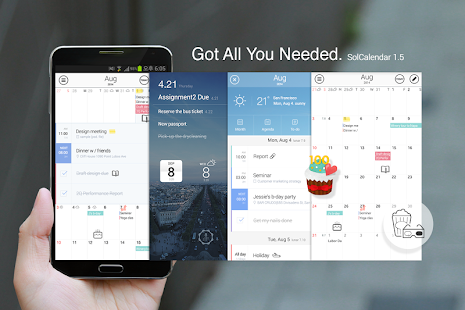
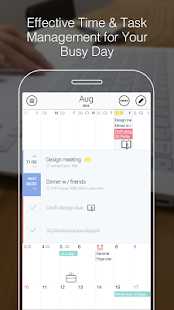
Intuitive UX• Daily Briefing and New Year’s Resolution banner• Manages your events, special days and to-dos• Supports Month, Week, Day, Agenda and To-do views• Offers various repeat options• Allows to set different timezones for app and event
Manage To-dos• Syncs with Google Tasks• Various repeat options for to-dos
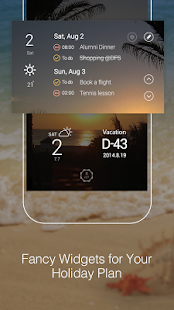
Fancy widgets for your homescreen• Polished Widgets that would decorate your home screen• Various widget types: Calendar, Agenda, Day, To-do, Countdown, Shortcut widgets etc)• Timetable widget
Weather Forecast and Map integration• Location-based, real-time weather information• Provides Weekly weather forecast• Google Maps & Foursquare Place API integrated
Lunar calendar and holidays by countries• Supports Lunar calendar & Holiday calendars of 41 countries• Supports 22 languages (thanks to the volunteer translators)
Stickers for your special events• Stickers to mark or remember your important day• New simple stickers(mono-tone) updated(* Stickers will be continuously updated)
SolCalendar is an effective life management tool that could replace your paper calendars, memos, post-its, planners , diaries and etc.Carry them all in one app.
It offers an intuitive and friendly UX.
SolCalendar Syncs with:• Google Calendar, Exchange• Daum Calendar, Naver Calendar, iCloud, Yahoo!
Calendar, Yahoo!
Japan Calendar, and any other calendar services that support CalDAV.• Google Tasks
[Our volunteer translators around the world]• Finnish : Tuuli Helminen / Patrik Selin• Indonesian : Oloan Sembiring / Wensen Roselan / Mzaifuddin• Italian : Fabrizio Santillo / Fabrizio Oddo / Karolina Gaiofatto / Tito Neroni• Danish : Nicklas Møller• German : Daniel Marcato / Jonas Straßer / Martin Philippi / Michael Grandjean / tim.w.de• French : Cedric Dubuis/ Tim Walter / Lee Chae Young• Russian : Andrew Skobtsov / Lim Heewon / Anastasia Yugay / Alexandr Krasnobelov• Turkish : Muhammet AKTAŞ• Spanish : Melissa H.
/ Cintli• Chinese : Jeun Eun Chang• Japanese : Lee Ga Young• Thai : Piraya Y.• Dutch : Edgar Newland / Niels Kikkert• Polish : Andrzej L.
/ Michal Kiender• Vietnamese : Natalie Dubs• Catalan : Catalan• Malay : yoska de jong• Portuguese (Brazil) : Augusto S Biffi / Eduardo Moura / Tito de Seu / Felipe Pedroti Raymundo• Hindi : Aarish Madaan / madhavdivya• Hebrew : Dayvid Gill (Hebrew will be supported soon)• Arabic : Argoubi Asma (Arabic will be supported soon)
(We're looking for volunteer translators!
If you're interested in translating SolCalendar into any language, please contact us via e-mail: [email protected])* Go to SolCalendar> Settings>Contributors around the world to view SolCalendar's translators!
Please do not hesitate to contact us at any time if you have any queries, ideas or reports.• SolCalendar User Community: http://goo.gl/vLUfWt• Facebook : http://www.facebook.com/LoveSolCalendar• Twitter : @SolApps
About SolCalendar - Calendar / To do
- Package name (App ID)
- net.daum.android.solcalendar
- Available on
- Google Play
- Price
- Free
- Developer
- Google Inc.
Looking for the SolCalendar - Calendar / To do APK?
The safest way to get SolCalendar - Calendar / To do (net.daum.android.solcalendar) on your Android device is to install it directly from Google Play — you'll always get the latest official version, automatic updates, and no risk of modified or infected APK files from third-party sites.
Social Features
Connect and share with friends and the community.
Weather Features
Get accurate weather forecasts and real-time updates.
Productivity Tools
Boost your productivity with powerful tools and features.
See SolCalendar - Calendar / To do in Action
Frequently Asked Questions
Is SolCalendar - Calendar / To do free?
Yes, SolCalendar - Calendar / To do is free to download and install on Android through Google Play.
How do I install SolCalendar - Calendar / To do on Android?
Open Google Play on your Android phone or tablet, search for SolCalendar - Calendar / To do by Google Inc. or tap the Google Play button on this page, then tap Install. The app downloads and installs automatically.
What is net.daum.android.solcalendar?
net.daum.android.solcalendar is the App ID (package name) of SolCalendar - Calendar / To do on Google Play. Every Android app has a unique package name, and it is the safest way to verify you are installing the official app.
Is SolCalendar - Calendar / To do safe to download?
Installing SolCalendar - Calendar / To do from Google Play is the safest option: you get the official version published by Google Inc., verified by Google Play Protect, with automatic updates. Avoid APK files from unofficial third-party sites.
Get SolCalendar - Calendar / To do Today
SolCalendar - Calendar / To do for Android — free download on Google Play.
Compatible with Android phones and tablets — available on Google Play.
Ask AI about this app
Get instant answers about features, tips and more from popular AI assistants.